Receive PO from NTU
Purchase Order Terms & Conditions
Please click
here
for NTU full PO Terms & Conditions.
Important Notes When You Receive an Interactive PO Email:
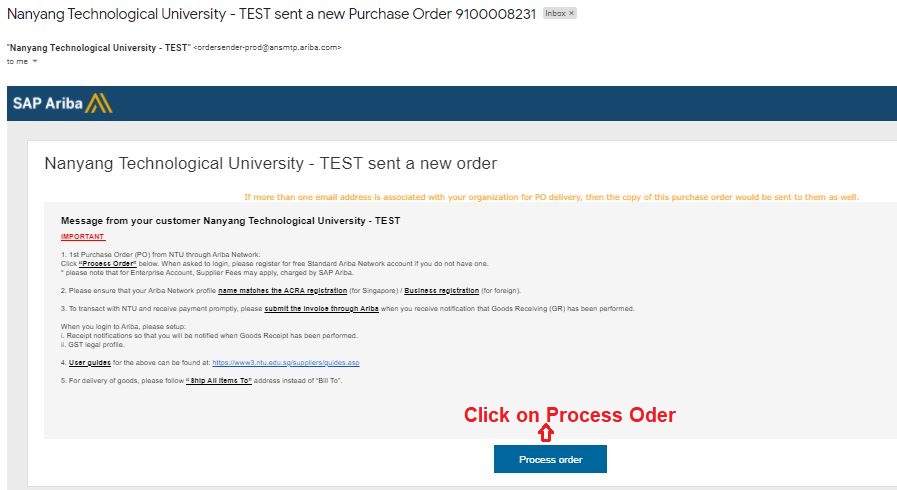
1) Viewing the Order
Upon receiving the interactive PO email, click “Process Order” to view the order details.
2. Purchase Order Template
Click here to see an example of an NTU Purchase Order.
3. Order Confirmation
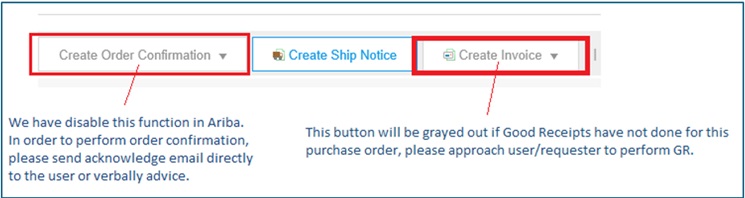
NTU has disabled the order confirmation feature in Ariba as this function adversely affects NTU’s internal processes. Instead, you may acknowledge receipt of the order by replying directly to the requester through the interactive email. The requester’s contact information can be found in the “Ship All Items To” and “Deliver To” sections of the PO.
4. Ship Notice
Creating a Ship Notice is optional and not required. To submit an E-Invoice via Ariba against the PO, a Goods Receipt (GR) must be performed instead.