
Goods Receiving
1. Delivery and Goods Receipt (GR) Required Before E-Invoice Submission
Suppliers can submit invoices through the Ariba Network only after goods have been delivered or services completed, with the corresponding Goods Receipt (GR) performed by NTU, supported by the Delivery Order or Service Report.
Suppliers should monitor GR notifications and follow up with the PO requester if the GR has not been recorded after delivery or service completion to enable timely invoice creation and payment.
2. GR Status and Invoice Eligibility
The “Create Invoice” button will remain greyed out until the required Goods Receipt (GR) has been completed.
The order status indicates the GR progress:
- “Received” – GR has been completed.
- “Ordered,” “New,” “Shipped,” “Changed,” or “Failed” – GR has not yet been completed.
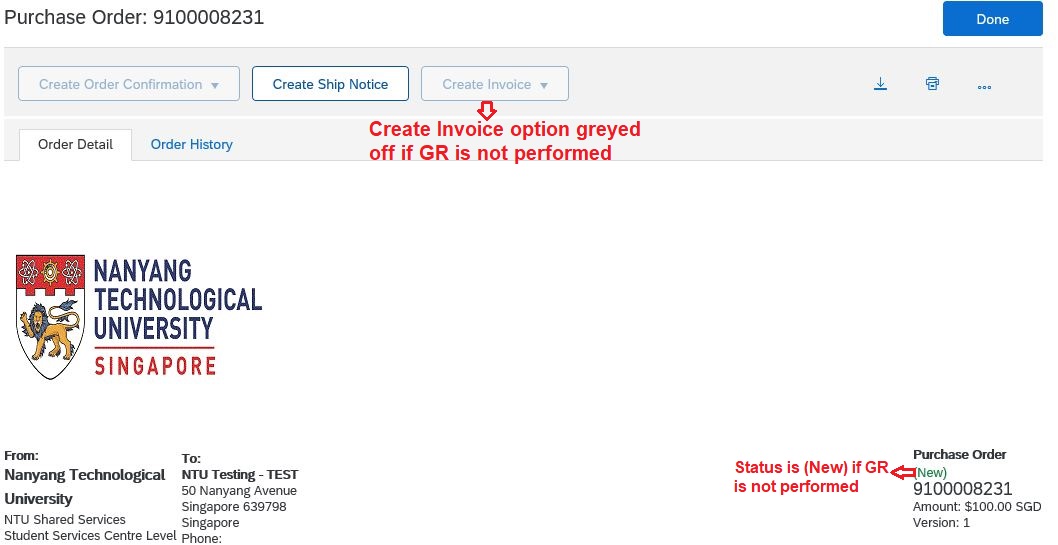
3. Goods Receipt Notification
Please enable notifications for Goods Receipt performed by NTU. You will receive an email notification once NTU has completed the GR. Please refer to the user guide for instructions.