

Methods of Invisible Watermarking Electronic Documents via the Generation and Application of Content-Agnostic Overlay and Underlay
Synopsis
The invention relates to invisible watermarking technique for electronic documents in computer, comprising a novel framework that can: (1) convert watermark data into tileable watermark image, (2) apply the watermark image as document underlay or screen overlay, (3) and extract watermark data from watermarked screenshots (or images).
Opportunity
This research presents strong commercial potential in the document security and compliance market, which is rapidly expanding under stricter data protection regulations. The proposed crop-robust, content-agnostic watermarking framework can be integrated into productivity suites (Word, Excel, PDF viewers), enterprise collaboration platforms (Zoom, Teams, Slack), and cloud document services (Google Docs, Office 365) to deter data leakage and trace document provenance. Unlike existing watermarking tools, this solution remains effective against common leakage practices such as partial screenshots or cropped screen recordings, addressing a major gap in enterprise data loss prevention (DLP), where screen-shared confidential documents must remain trackable.
Commercially, the technology can be monetised through:
Licensing to SaaS providers for document collaboration and video conferencing;
Integration into enterprise DLP/security suites as an advanced watermarking add-on;
B2G adoption for securing classified government documents and sensitive workflows.
Given the rising costs of data leaks and compliance breaches, this approach positions itself as a lightweight, imperceptible and high-assurance solution that can set new industry standards for document provenance and digital rights management (DRM).
Technology
The framework converts watermark data into a tileable watermark. This image can be embedded as document underlay or live screen overlay. A watermark extracting module can extract the watermark data from portions of the document. This is achieved by a shift-equivariant convolutional neural network and a multi-head attention downsampling layer, enabling robust and content-independent watermark detection.
- Watermark image generation module converts plain text into watermark image. The plain text can be arbitrary string, such as “user1”.

Figure 1: Generated watermark image for text “user1”.
- Watermark image application procedure embeds the image as document underlay or live screen overlay. In the latter case, the image is incorporated with the live screen through alpha-blending. Examples of such overlays are shown below:
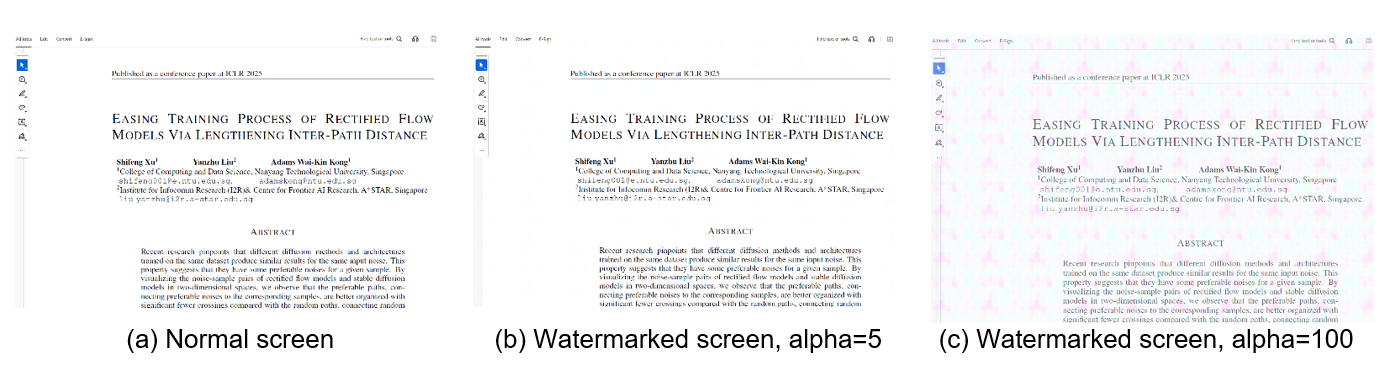
Figure 2: Screen overlay with alpha-blending. The alpha value ranges from [0, 255], determining the visibility of watermark image. This framework uses alpha = 5 as shown in (b), while (c) is included solely for demonstration purpose. - Watermark data extraction module can extract the watermark data from arbitrary patch of the watermarked image. To mitigate random errors, multiple patches can be analysed.
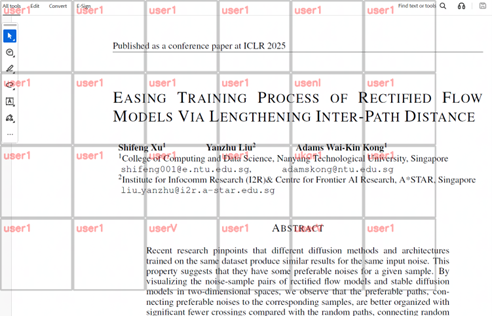
Figure 3: Watermark extraction results on multiple patches.
Meanwhile, statistical results are computed:
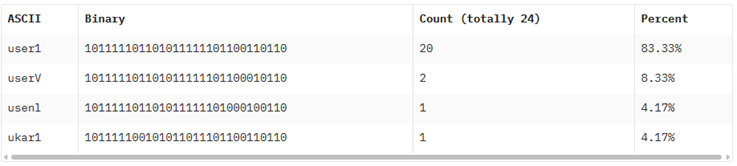
Figure 4: Watermark extraction statistical result.
Applications & Advantages
Applications:
- Collaborative workspaces where information leakage is sensitive, such as (i) transfer document, (ii) transfer screenshot of document, (iii) transfer screenshot of shared screen of others (as illustrated in Figure 5).
- Online meeting platforms such as Teams/Zoom, etc.
- Industries where tamper proof documentation is required.
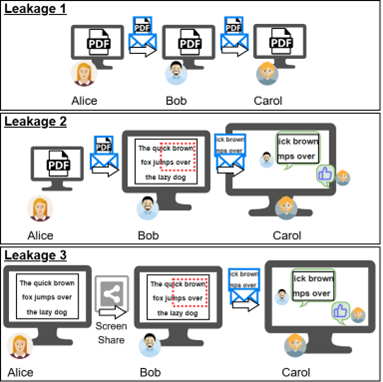
Figure 5: Different scenarios of document leakage.
Advantages:
- Watermark information is independent of the target document or image.
- Watermark can be applied throughout document or image with invisible change.
- Small portion of cropping can do the watermarking detection.